
 By Richard Smith

Introduction
As someone who has been building software since the late 90s, I find Airtable genuinely exciting, it offers a real window into where enterprise software is headed. To give you a sense of what is possible, we recently built a complete loan management platform on it for a UK bank. Both the bank and their partners love it.
Everything in this document relates to the Airtable Enterprise plan as at May 2026. See the Airtable plans documentation.
However There Are Some (Potential) Blockers
That said, deploying Airtable in a true enterprise environment does come with some real challenges worth being upfront about:
- Record Limits: Standard tables are capped at 500,000 records per base
- API rate limits: At 5 requests per second, high-volume integrations need careful design
- Audit history: Built-in retention is limited, which can concern compliance teams
- Code deployment: No native pipeline, releases require a disciplined manual process
- Code reuse: Scripts cannot be shared across bases, leading to duplication over time
- Code editing: The built-in editor is basic, making complex scripts a struggle
- Performance: For data-heavy operations, it can feel sluggish
- Environment management: No native dev/staging/production concept; you will need to roll your own
- Mandatory fields: No way to enforce required fields at table level; you will need to roll your own
None of these are deal-breakers — all can be worked around. Here is how we approach each one.
Why Use Airtable Over Power Platform (Power Apps)?
This is a fair question — most enterprise organisations already have Microsoft licences, so using a third-party tool such as Airtable can seem counterintuitive. However:
- 1It is a lot easier to use. Airtable's UI is genuinely accessible. If you are comfortable with spreadsheets you will find your feet quickly, no deep technical knowledge required.
- 2External collaboration. Sharing forms, mobile apps, and reports with clients or suppliers is straightforward, and without the licensing costs that come with Power Platform.
- 3Cost. Simply put, it is significantly cheaper.
- 4The cool factor. Not a traditional enterprise requirement, but if you want to energise staff to build their own apps and migrate away from current systems, this is a good place to start.
Issue One: Record Limits
Talking about record limits in modern database engines seems old-fashioned, yet it is a real consideration with Airtable, particularly in enterprise where detailed logging and data retention are non-negotiable.
The reason for these limits comes down to performance. Airtable's speed and responsiveness rely on keeping entire datasets in memory on the server, a costly approach that becomes increasingly expensive as RAM prices continue to rise. Do not expect this constraint to disappear any time soon.
One important nuance: Airtable stores record-level audit logs for three years, and these are both searchable and accessible via the API (important, as the admin panel is limited to returning 10,000 events per query).
Ways to work within these limits:
- 1Offload high-volume records to external storage. For data that accumulates quickly, consider using Azure Functions or AWS Lambda to handle storage outside of Airtable. A good example is audit logging, rather than storing every ledger update in Airtable, create an external function to handle it instead. Here is an example of Airtable JavaScript that sends data to an external audit service:Code
// Get the input parameters
                  let inputConfig = input.config();
                  let record_id = inputConfig[''];
                  let test_mode = inputConfig.test_mode == "true";
                  let audit_x_api_key = inputConfig.audit_x_api_key;
                  let audit_service_endpoint = inputConfig.audit_service_endpoint;

                  async function send_to_my_enterprise_audit_service(reference, description, audit_type) {
                    try {
                      const response = await fetch(audit_service_endpoint, {
                        method: 'POST',
                        headers: {
                          'Content-Type': 'application/json',
                          'x-api-key': audit_x_api_key,
                        },
                        body: JSON.stringify({
                          reference: reference,
                          user_name: "System (via Automation CREATE_TRANSACTIONS)",
                          datetime: new Date().toISOString(),
                          description: description,
                          audit_type: audit_type
                        })
                      });
                      await response.json();
                    } catch (e) {
                      console.log("Expected issue");
                    }
                  }
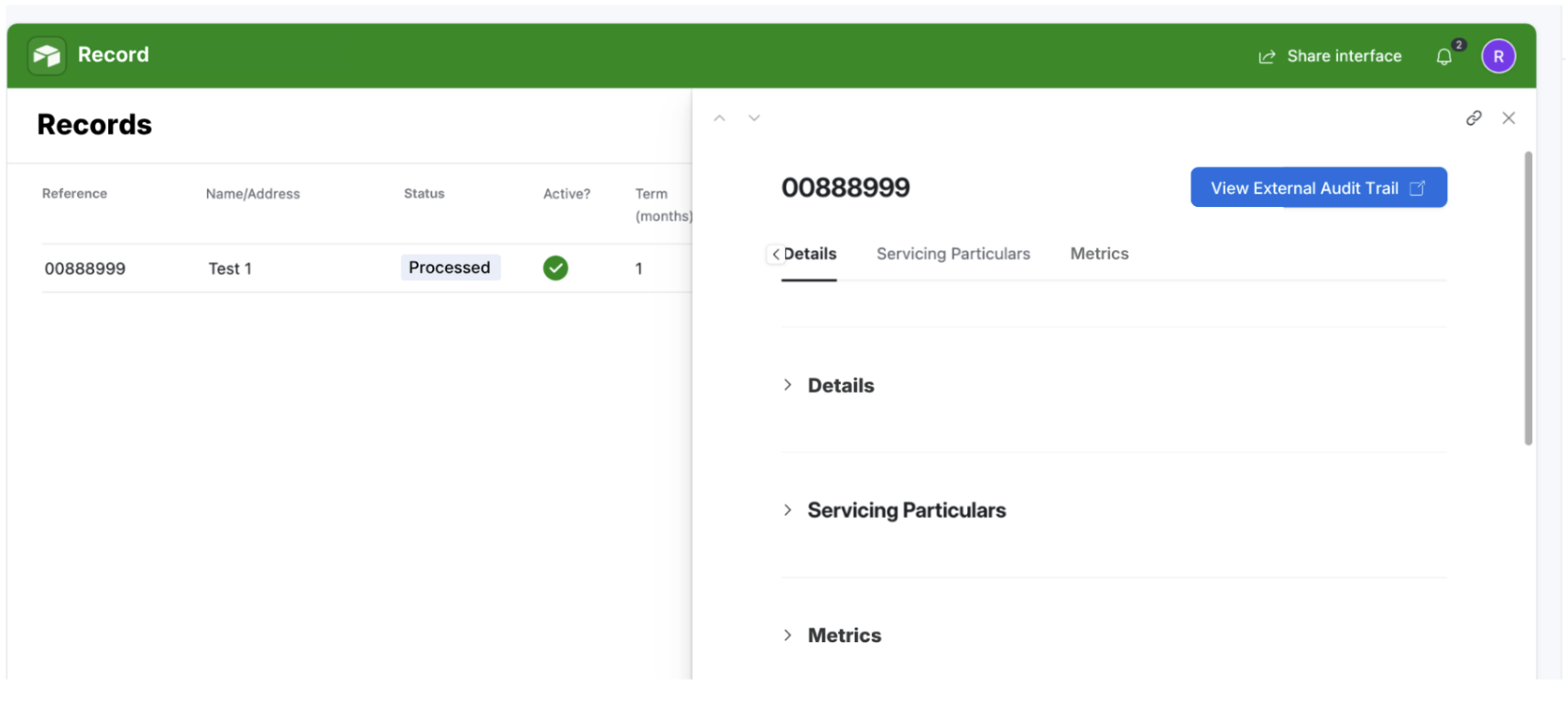
To retrieve the records later on, you can connect a button to your Airtable interface, which goes to an external site to show the records.
- 2Use HyperDB. Provided you have an Enterprise plan, HyperDB lets you store up to 100 million records per table and is very easy to set up. Note that field types are more limited in HyperDB, and permissions are more granular.
Issue Two: API Rate Limits
5 requests per second, or 300 per minute, is not much for an enterprise system. Here are the most effective mitigations:
- 1Batch your requests. You can handle up to 10 records per request, meaning up to 3,000 records per minute. See Airtable's rate limit documentation. The example below sends two upserts simultaneously:Code
curl -X PATCH "https://api.airtable.com/v0/{baseId}/{tableIdOrName}" \ -H "Authorization: Bearer YOUR_TOKEN" \ -H "Content-Type: application/json" \ --data '{ "performUpsert": { "fieldsToMergeOn": ["Name"] }, "records": [ { "fields": { "Address": "501 Twin Peaks Blvd", "Name": "Twin Peaks", "Visited": true } }, { "fields": { "Name": "New Park", "Visited": true } } ] }' - 2Negotiate with Airtable. Large enterprise clients may be able to get limits raised, though Airtable can also change them at their discretion.
- 3Throttle your requests. A job queue is a more robust solution than rate-limiting in code, it handles throttling, errors and retries centrally. We use Amazon SQS for message queueing.
- 4Use CSV uploads for bulk operations. Airtable's Sync API supports CSV uploads of up to 10,000 rows per request, reducing individual API calls significantly.
Item Three: Audit History
The retention period for record-level revision history in the Enterprise Plan is three years by default; however, this can be changed for up to ten years. There is also a log of events that can track users who have shared links or downloaded attachments.
For added safety, store all the events in a separate external database, made manageable by Airtable's event streaming capability. The endpoint below returns up to 1,000 of your enterprise's most recent events in reverse chronological order:
curl "https://api.airtable.com/v0/meta/enterpriseAccounts/YOUR_ENTERPRISE_ACCOUNT_ID/auditLogEvents/?next=MDFHUk5OMlM4MFhTNkY0R0M2QVlZTVZNNDQ" \
  "-H Authorization: Bearer YOUR_TOKEN"
Item Four: Code Deployment
Airtable has no native concept of a build pipeline. Scripts in Automations and Scripting Extensions live directly inside the base, are edited in the browser, and "deploying" essentially means clicking out of the editor. For a small internal team that is workable; for a regulated bank workflow, it is a different story.
The most painful consequence is the absence of any code change history. Airtable's revision history tracks data changes, but the Automation scripts themselves sit in a single editable text field with no version control surfaced to admins. There is simply no answer to "what changed in the code on Tuesday?"
Patterns that work:
- 1Treat Git as the source of truth. Every script in the base has a canonical copy in a Git repository, named for its location e.g.
automations/loan-approval/run-credit-check.js. Anyone editing in the browser does so on a feature branch in Git first, gets the PR reviewed, then pastes into Airtable as the deploy step. It is manual, but it gives you the audit log regulators want. - 2Use Airtable Sandboxes (Enterprise plan only). A sandbox is a temporary copy of the base where you can safely edit the schema and automations, then merge back into production. As of early 2026, the merge is not entirely seamless. It conflicts on linked records need manual resolution, and certain automation changes do not merge cleanly, but it is the closest thing Airtable has to a staging environment.
- 3Use the Metadata API to push code. The Web API's scripting endpoints let you read and update script bodies programmatically. This means a CI step running on merge to main can push the latest script into the right Automation slot. For the loan platform we ended up using a GitHub Actions workflow that calls a small Node script writing updated bodies to matching automation IDs.
- 4Name deploy slots, not files. Inside Airtable, name each automation step using a stable identifier like
[A001] CreditCheck v3so the CI deployer knows which slot to overwrite. - 5Tag a release in Git every time you deploy. Even if Airtable does not have releases, you should. Tag the commit, note which base it was merged into, and write a one-line release note. Old-fashioned, but it gives compliance something to point to when they ask "what code was running in production on 14 March?"
- 6Do not forget the base itself. Schema changes (new fields, new tables, changed link relationships) also need to be promoted from dev to production. Use the Metadata API to snapshot the schema as JSON and commit it alongside the code, and you now have a diffable history of structural change.
Item Five: Code Reuse
Airtable scripting has no module system. There is no import, no require, no shared library. Each script is a self-contained, sandboxed JavaScript blob. If you have a formatCurrency function you want to use in fourteen different automations, you copy and paste it fourteen times.
- 1Maintain a snippet library in Git. Keep a
lib/directory with files likeformatting.js,validation.js, andairtable-helpers.jscontaining canonical implementations. When you update a snippet, grep the repo for every script that uses it and update them in lockstep. - 2Use a preamble build step. A small Node script reads each script file, looks for
// @include lib/formatting.jsstyle comments, and inlines the contents before the script is pushed to Airtable. Combined with the Metadata API deploy from Item Four, the inlining happens automatically on merge. - 3Push the logic out of Airtable entirely. Put non-trivial business logic into an external service (Azure Function, Lambda, Cloudflare Worker) and have Airtable call it. The Airtable script becomes a thin wrapper:This is the pattern we recommend for anything called from more than one place, anything you would want to unit-test, or anything that touches money.Code
const response = await fetch('https://api.internal/credit-check', { method: 'POST', headers: { Authorization: `Bearer ${API_KEY}` }, body: JSON.stringify({ recordId, applicantId }) }); const result = await response.json(); - 4Custom Extensions instead of Scripting Extensions. The Custom Extensions framework is a proper React/Node project with
package.json, npm dependencies, and a block CLI for deploys. If you are building anything substantial inside the Airtable UI; a dashboard, a wizard, a custom data entry flow — build it as a Custom Extension. - 5Accept that copy-paste is sometimes the answer. For trivial helpers (a date formatter, a logger wrapper), the overhead of any of the above is greater than the cost of duplicating ten lines of code. Reserve the patterns above for code that matters.
Item Six: Code Editing
The in-browser Airtable editor is functional but bare. There is no IntelliSense beyond very basic autocomplete, no debugger, no breakpoints, no inline lint, and the text area will lose your work if your browser refreshes at the wrong moment. The only debugging tool is console.log() into a panel below the editor.
- 1Author scripts locally in VS Code or Cursor. Use the official TypeScript definitions for the Airtable Scripting API — they give you full autocomplete for
base,table,input,output, and the rest. Write as.ts, runtscfor type-checking, then paste the compiled JS into Airtable. - 2
- 3Use ESLint with Airtable-specific rules — disallow
require,import,process.env, and Node built-ins. Stops the most common "works locally, breaks in Airtable" surprises. - 4Keep scripts short. The editor's pain scales non-linearly with length — a 50-line script is fine, a 500-line script is purgatory. If a script grows past ~100 lines, refactor it into an external Lambda call (see Item Five).
- 5
- 6Always copy to the clipboard before refreshing. The editor autosaves "when you click off the editor" — if your browser dies first, the work is gone.
Item Seven: Performance
Airtable is one of the most pleasant database UIs ever built. It is not the fastest. Bases with hundreds of thousands of records, many linked tables, and chains of formula/lookup/rollup fields slow down noticeably — in the UI, in scripts, and in automations. Interfaces with many elements can take several seconds to render. Automations can take ten to thirty seconds to fire on a busy base.
Things that slow Airtable down most:
- Long chains of lookup and rollup fields, flatten where you can, denormalise read-often-written-rarely values into regular fields updated by automation
- Formulas that reference linked records, especially with ARRAYJOIN, ARRAYUNIQUE, or large IF(FIND(...)) expressions
- Views with no filtering and many fields visible, build narrow, filtered views for daily use
- Interfaces with multiple list and chart elements, each element makes its own query
- Automations that loop through many records, batch the writes (see Issue Two)
Pragmatic fixes:
- 1Denormalise aggressively. Cache the result of expensive lookups into a plain field updated by automation. The base is a database with terrible joins - treat it like one.
- 2Use HyperDB for large read-mostly tables (covered in Issue One). Significantly faster for large dimension or reference tables.
- 3Move heavy reads out. If an interface page is slow because it summarises 200k transactions, the answer is usually "precompute the summary nightly into a small table."
- 4Cold-start workarounds for automations. Webhook-triggered automations have a noticeable cold-start on bases that have not been touched recently. Do the minimum work in Airtable and run the rest externally.
- 5Be honest with users about timing. Airtable is not a millisecond-latency tool. "This dashboard refreshes every 5 minutes" is a more honest UI than a perpetually loading interface.
Item Eight: Environment Management
There is no "dev / staging / prod" inside Airtable. There is one base, edited live, by whoever has access. Sandboxes (Enterprise only) help, but they are not a full multi-environment story.
What we do:
- 1Three bases per product:
[DEV] Loan Platform,[STG] Loan Platform,[PRD] Loan Platform. The naming convention matters, it shows up in every dropdown and stops the "wait, which base am I in?" moment. - 2A Config table in each base. Single row, fields like
Environment,ExternalApiBase,WebhookUrl,NotifyChannel. Every automation reads from this table rather than hardcoding URLs. Promoting code from dev to prod does not mean changing the code, the URLs come from Config. - 3Sandboxes for schema changes. When you need to add a new field or change a link, do it in a sandbox of the production base. For automation code, the Sandbox merge is less reliable. Promote code via the Metadata API path described in Item Four.
- 4Snapshots before any production change. Airtable's snapshot feature (Base settings → Snapshots) gives you a point-in-time copy you can restore from. Take one before any schema change or mass update. It has saved us at least twice.
- 5Permissions split by environment. Dev is open to developers. Staging is open to developers plus the business owner. Production is locked to a small group plus the automation service account. Use Airtable's Enterprise SSO and group memberships to enforce this.
- 6CI promotes code, humans promote schema. Schema diffs are hard to do automatically and benefit from human review. Code diffs are easy and benefit from being mechanical. Let CI handle code; keep a human in the loop for schema.
Item Nine: Mandatory Fields
This is the one that genuinely surprises enterprise architects. You can mark a field "required" on a Form view, and that form will refuse to submit. The API will happily insert a record with that field blank. So will another form. So will automation. So will somebody pressing the + button in the grid view. There is no schema-level NOT NULL in Airtable.
Workarounds, in order of robustness:
- 1Validate at the boundary. Any external system writing to Airtable must do its own validation before the API call. We wrap the Airtable API in a small library like
createLoan(applicantId, amount, term), that validates inputs and rejects the call if anything mandatory is missing. The raw Airtable API is not available to integration code, only this wrapper is. This is the only workaround that actually prevents bad data getting in. - 2Status-gated workflow. Every record has a Status field that starts at Draft and can only progress to Active once an automation has confirmed all mandatory fields are populated. Downstream automations only fire on Status = Active. Bad data is still in the base, but it never reaches anything that matters.
- 3A formula field called
_ValidationErrors. Returns a string listing every required-but-missing field, e.g. "Missing: Term, Applicant DOB". Use it in conditional formatting to red-flag bad rows and in the status-gated workflow above. - 4An hourly validation automation that scans the table and flags or quarantines records with missing mandatory fields. Crude, slow, and reactive, but a useful safety net.
- 5Form-only entry for human users. If a record can only be created via a Form view that marks the field required, you have at least closed the human-error path. The API path remains open.
The honest answer to "why does not Airtable enforce this?" is that Airtable was built for spreadsheets first and applications second. Until that changes at the platform level, validation has to live in the layer between Airtable and whoever is writing to it. For a regulated system, the Airtable API is never the integration point — your validation wrapper is.
Closing Note
None of the nine issues above is a deal-breaker. We have a live, regulated, money-moving loan platform running on Airtable today, and it works. But every one of them has to be designed around at the start of the project, not discovered six months in.
The pattern across all of them is the same: Airtable is excellent at being Airtable, and any time you find yourself wishing it were a traditional application platform, the fix is to push that responsibility out to a traditional application platform, Lambda Function, Worker queue, and let Airtable do what it is good at: modelling the data and giving humans a delightful UI to work with it.
If you are evaluating Airtable for an enterprise build, the checklist is short: do you have, or can you build, a thin layer of external services to sit between Airtable and the rest of the world? If yes, you can almost certainly make it work. If the answer is no, look at Power Apps.
Want help with Airtable?
Talk to the team that wrote this guide
We have built regulated, enterprise-grade platforms on Airtable and can help you navigate these challenges from the start. Book a free 30-minute session with one of our technologists.
View our Airtable services →